
Relationship view
Power BI, similar to Power Pivot, has a look at the tables and their relationships. Its advantage is that, from the very beginning, automatically detects relations between tables based on the name of the column that it discoveres as keys. From November 2018 the new, significantly enhanced Relationship view is offered, so in the following text it will be about what are its features and what is new.
The new look of the Relationship View is still in the development phase so it is necessary to include it in Power BI first, which is done from the Power BI Desktop application’s Options dialog. After we do it, and then restart the program, an icon will appear on the left that looks just like the one that represents a traditional view of the data model with a “asterisk”. It represents new Relationship View.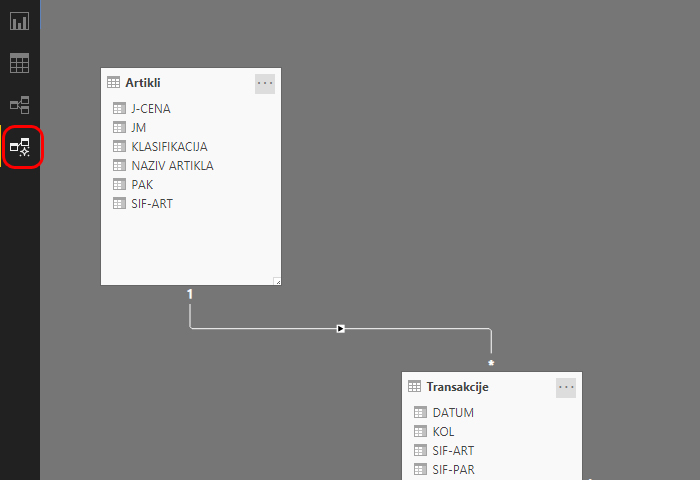
In the central part of the screen we can see tables whose appearance is slightly changed in relation to what we have met before. The main novelty is that on the right there are two new panels: Fields and Properties. In the Fields panel, we can see all the tables in the model, as well as the columns (fields) that exist in them. In case we have a model that consists of a large number of tables, it makes it easy to navigate to the desired table/column.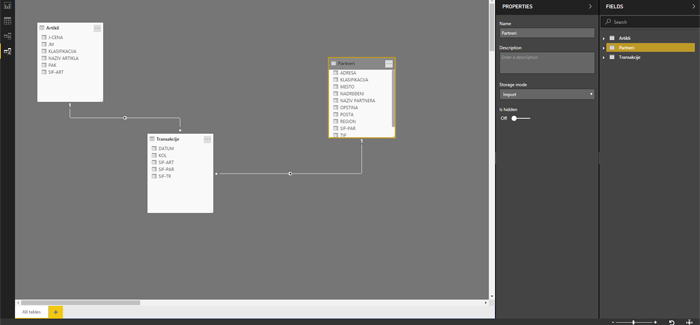
If we select a table, the Properties panel displays its name and description, which we can change if we want to. Also, there are also options for hiding in the model, as well as the Storage mode option by which we choose how data is retrieved. By opening the menu, it will offer three ways of connecting to data: Import, Direct Query and Dual. The default value is Import and it indicates that, when connecting to the data source, we import data into the model. Direct Query is used when directly connecting to the data source, and Dual is a combination of two previous modes.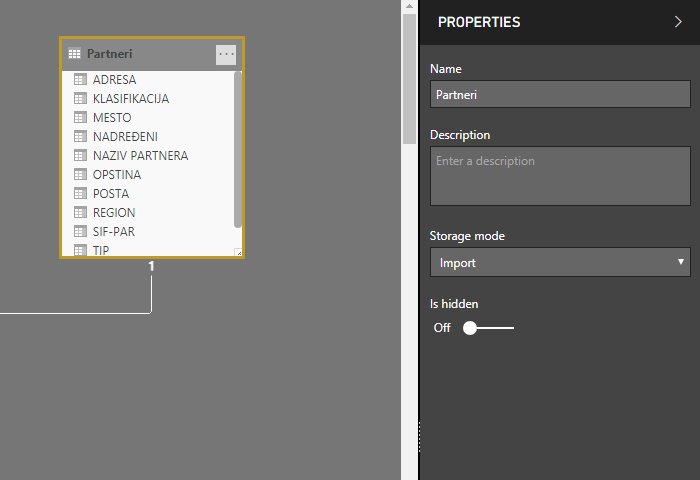
New Relationship View offers the ability to create multiple data model schemas. We add a new scheme by clicking on the button marked with the “+” sign, located at the bottom of the screen. This process is similar to the addition of a new worksheet in Excel. it is a handy option when you import a lot of tables, and you do not want them all in one schema.