Conditional aggregation of data

Data aggregation represents a mathematical operation (summarization, counting, averaging) that we perform over a set of data. Conditional aggregation, as its name implies, is performing data aggregation over a set of data that meets certain condition which is contained within a given data range. In this “recipe” we’ll cover functions that use single condition for performing aggregation.
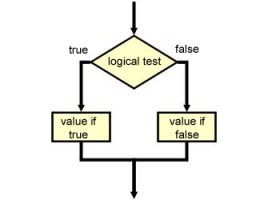
Testing a condition

Testing of the conditions is done so that, depending on its fulfillment, we will get different results. These can be some concrete values, but most often, depending on the fulfillment of conditions, we devise different formulas for calculating. It is possible to create multiple conditions (multi-branching) or as a condition to specify an index that determines which expression will be calculated. The following text will detail the logical functions for testing the conditions.

Functions for data aggregation

Aggregation is a term that signifies unification and calculation. It combines one or more data sets, which are given as function arguments, for performing a mathematical operation. This may be: summing up a series of data, counting, averaging, calculating the minimum or maximum value of a given set of numbers… Aggregate functions are very commonly used and should know them well.

The richness of functions

Excel has a large number of functions, organized according to categories (mathematical, statistical, logical, informative, financial, functions for working with text, etc.). When we start typing the formula and choosing the desired function it automatically displays the syntax in the form of a tooltip that facilitates the input of the function arguments. We can also add functions by selecting a window to insert functions that will be further discussed in the text that follows …

Finding errors

Errors in the calculations are a common thing. The more data in the table and the formula are the more likely we are mistaken. Excel immediately shows us an error as soon as it comes in, but it’s not always easy to find out how it came to it. Also, sometimes it may happen that we miss the error because there was no mistake in mathematical operations. Excel has several options for detecting and finding errors, which will be said in the following text …