RANDARRAY function

One of the previous “recipes” was about randomly generated numbers, ie the use of the RANDBETWEEN function. The RANDARRAY function works similarly to the fact that, unlike the one mentioned above, it generates a random range of numbers (vector or a matrix) based on previously specified rules. This is one of the new Excel functions that is available only to Office 365 subscribers. Let’s see how it is works!
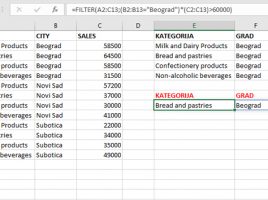
Filter FUNCTION

For some time now, Microsoft “evangelists” have been talking about about new Excel functions that make it possible to work with dynamic arrays. What is it about? Excel is enriched with a group of functions that provide dynamic content filtering. Since they finally became an integral part of Office 365 Excel in February this year, the following few “recipes” will, through simple examples, show you the new features they bring.

DAX table generating functions

DAX is a language that comes in several flavors. While most features are available at the same time for Excel, Power BI and SQL Server Analysis Services some of them are platform-specific. Because Power BI has the ability to generate tables and there are DAX functions that, as a result, return tables in this post we will address some of them that can only be only used in Power BI DAX statements, not in Excel.

Excel functions in VBA

The VBA language can use two types of functions: those inherent to it and functions that already exist in Excel. Although VBA has a large number of functions in Excel there are even more of them. And since we don’t want,  as the saying goes, to „invent the hot water“ it’s often better to use one of the existing functions to finish the job. This is accomplished using the Application.WorksheetFunction method that allows us to call any available Excel function.

Custom functions

In the preceding text we talked about procedures and now we will mention functions. Functions are known as subroutines that calculate and return certain values. We can call them from other programs and it is possible to create custom functions that we will later use in worksheets. This is useful when Excel does not have the specific features you need to perform everyday work.