Office Scripts

For years, Microsoft has been trying to replace VBA (Visual Basic for Applications), the programming language that “lives” in the background of Excel. As they say, the reasons are of a security nature. This is not entirely without merit, but it seems to me that the motive of the Excel development team, to a greater extent, was to create scripts that would fit better into the Microsoft 365 and Power Platform ecosystem. Whether they succeeded in this is up to you to try.

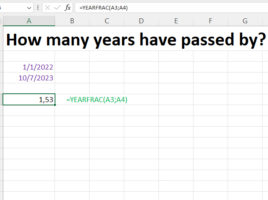
YEARFRAC function

This function, for given start and end date, calculates how much time has passed in years, and as a result returns a decimal number. It can be used to calculate annual interest, future value and in other cases when it is necessary to know how many years have passed. In the text that follows, through a simple example, you will get to know this function.

Retreiving data from pictures

Power Query (which has been the go-to tool for importing data into Excel for some time now) has a new option! Rereiving data from PDF documents has been around for a long time, and now you can also pick up tables from an image or image on the clipboard. So, if someone sends you an invoice that they took a photo of via Viber or WhatsApp, you don’t have to enter the data manually.

Recommended Pivot tables

Pivot tables are a report that has existed in Excel for a very long time, and it allows us to look at a source dataset from different angles, as well as to easily change views on the data. Despite the fact that this is a very useful report, many people still do not know how to use pivot tables. That’s why Microsoft recently added an option in Excel by which, based on the selected data, it can recommend you what kind of pivot table to create.

Where it was?

Microsoft is constantly working to improve the user experience and make everyday work in Excel easier. A few years ago, the „Tell me what you want to do“ option appeared, and later its functionality was integrated into the Search field, which you can still see in the title bar of any Excel document. Search is now part of the context menu, and browsing Excel features is even easier than before…