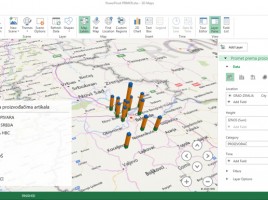
3D maps

3D Maps (PowerMaps) is tool for graphical representation of data in relation to geographical locations on a 3D model of the planet Earth. It is an Excel add-in that is of version 2016 became an integral part application. Based on location data from the Model Excel is connected with Bing maps and finds geographical coordinates on which to draw map charts for given reporting dimensions, such as turnover (sales) or price difference …

Advanced Data model options

In addition to options we use on daily basis Data model has some advanced options too. With them, we can define the perspective view on the table. Also, we can determine the behavior of columns when they are dragged in the Pivot Table, as well as to set additional attributes table that can be used when creating reports. Finally, it is possible to make one or more synonyms for each column, which later makes it easier to search the model.

Data model

Data model is used to add and connect tables in a whole, in order to retrieve the data needed for reporting. This is a pseudo-base, part of Excel document. By adding a table into the Model data are automatically compressed; later, when we need them for reporting, they are decompressed and used as a reporting dimension in the pivot table. Data model is basis for use of “Power” technologies, i.e. “self-service” business intelligence tools.