
A slightly different cell address
The address of a cell in Excel is formed by combining the column label and the row number. For example, the address A1 indicates that it is a cell that is in the first row of column A. However, we can also assign an address in another way- by using the row number label and the column number. Thus, cell A1, in this alternative notation, would have the address R1C1. How to change the way the address is assigned and can it be of practical use?
If you want to use an alternative way to assign addresses to cells in Excel, open the options menu (File/Options), enter the Formulas submenu and select the R1C1 reference style option.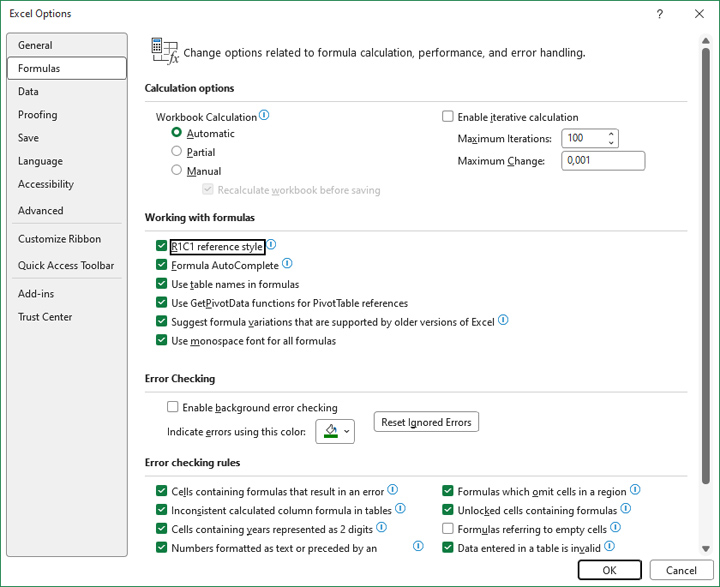
After you check this option and select a cell, you will see its address in the Name Box, displayed by the row and column label to which it belongs.
How to sum up the total value of sales of Sauvignon Acacia wine for all four quarters? The usual way would be to use the formula:
=SUM(B2:B5)
However, since we have changed the way we create addresses, the formula will look like this:
=SUM(RC[-4]:RC[-1])
In this notation, RC[-4] denotes a cell that is four positions to the left of the one we are currently in, and RC[-1] is a cell that is one position to the left. As you can see, the principle is similar, but the notation is different.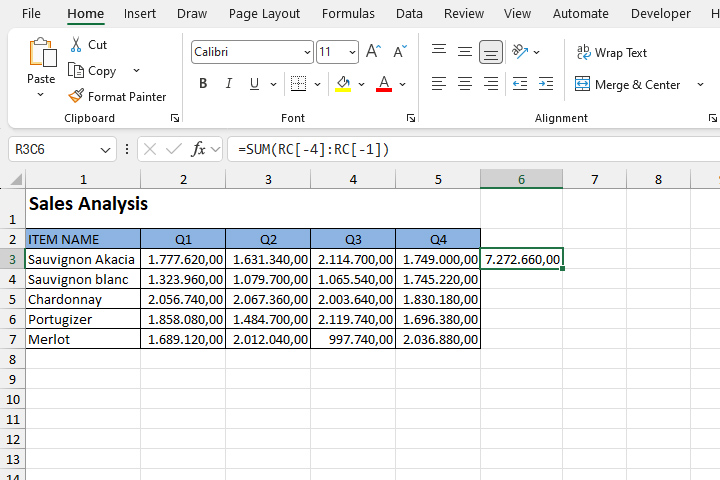
Can this speed up your work? Judge yourself…