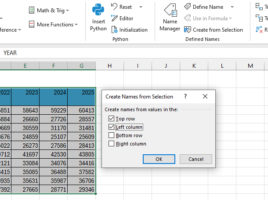
Creating a name from selection

When you create formulas in Excel, you can refer to cell addresses, and you can also name cells or ranges by using the Name Manager to create the appropriate names. Can names be created automatically? Yes they can! After selecting a range, and giving a criterion in the Create from Selection option, you can create names automatically…

A slightly different cell address

The address of a cell in Excel is formed by combining the column label and the row number. For example, the address A1 indicates that it is a cell that is in the first row of column A. However, we can also assign an address in another way- by using the row number label and the column number. Thus, cell A1, in this alternative notation, would have the address R1C1. How to change the way the address is assigned and can it be of practical use?

Advanced data grouping

In one of the previous “recipes” we talked about how to use the Excel GROUPBY function. On that occasion, you could find out how to use it in one of the standard scenarios of its application, and now you will learn how to use it in a slightly more advanced way. To begin with, how you can group by two or more dimensions, and then how to display percentages, determine the depth of the calculation, and so on.

Summarizing in gross

The old word angro, sometimes used in the Serbian language, comes from the French term “en gros” which means “in gross”, “wholesale” … It served me as the inspiration for the title, and in the text I want to show you advanced possibilities when using the SUM function. Let’s see in what, not very common, ways we can give it arguments and summarize the data.

Multiple aggregation criteria

A very rugged title, isn’t it? When you use multi-conditional data aggeregation functions like SUMIFS, AVERAGEIFS, COUNTIFS, etc. there may be multiple values ​​from one column that you want to consider. This is accomplished by listing these values ​​in curly brackets and then summing all the results. Here’s a quick guide to how to use multiple values ​​for a one criterion.