Function GROUPBY

If writing SQL queries is in your job description I am certain that you, in great extent, inside SELECT command, use a GROUP BY clause that allows you to group row values by a given column and then apply an aggregation function, e.g. SUM, COUNT, AVERAGE, MIN, MAX… I have good news for you: we can achieve almost the same thing within an Excel report by using the GROUPBY function…

YEARFRAC function

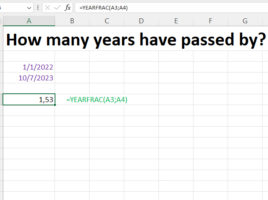
This function, for given start and end date, calculates how much time has passed in years, and as a result returns a decimal number. It can be used to calculate annual interest, future value and in other cases when it is necessary to know how many years have passed. In the text that follows, through a simple example, you will get to know this function.

CONVERT function

How many grams are there in one cup? How many grams fit in a tablespoon? And in a coffee spoon? This is information that until now you had to search for on the Internet, and since recently there is an Excel function that enables these and some other conversions. It is very easy to use, and if you want to know how, read this “recipe” (it cannot be converted into several smaller ones, but it is interesting)!

IMAGE function

If you use Power BI Desktop to create business reports, you probably know that it is possible to insert an image into a table that is displayed based on its URL location. As of recently, if you are a Microsoft 365 subscriber, you can also do this in Excel using the IMAGE function. In this “recipe” you will find out how it is used…

Keep or discard?

If you have used Power Query, you know that it has options that allow you to keep or discard certain columns. If you’re an Excel user coming through a Microsoft 365 subscription, there are a few new functions available to you to do a similar thing. As a result they create a dynamic array with columns or rows extracted from a given matrix that are retained or discarded.