EOMONTH function

Sometimes, while using Excel, you need to specify the date on which a particular month starts or ends in order to perform the desired calculation on that day. Although, with a little effort, these dates can be calculated in the traditional way, you will be greatly relieved by using the EOMONTH function. You will learn more about this function in the following text…

Advanced Formula Environment

Writing Excel formulas with the help of Name Manager can be a demanding job. When you write simple formulas, you will still somehow manage. With complex formulas or changing existing ones, there is a high chance that you will make a mistake. The LAMBDA feature allows you to create your own functions as names added in the Name Manager, and to make this job easier, Microsoft has created an Excel add-in for creating complex formulas: Advanced Formula Environment.

Multiple criteria MATCH

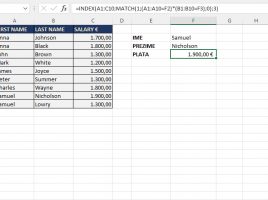
Sometimes, when working on business reports, there is a need to create a formula that contains several criteria for searching a range. When we have only one criterion, it is enough to use a combination of INDEX and MATCH functions. When there are more of them, it is already a bit more complicated situation. However, this is not too complicated either, you will see in the “recipe” that follows…

ISOMITTED function

This is a logical function used as an argument by the LAMBDA function, and it aims to check if any of the arguments have been omitted. When using the LAMBDA function, it is mandatory to provide as many arguments as initially given. Since it returns the value TRUE or FALSE it is used in combination with the IF function in the part of the LAMBDA function where it is necessary to specify the value it returns.

BYROW and BYCOL functions

The BYROW and BYCOL functions are used to perform a calculation given by a LAMBDA function that uses only one argument for a given row or column. This, in a way, distinguishes them from the function mentioned in the previous post. Both functions work in a similar way. They differ only in whether they retrieve the data needed for the calculation from the row or column.