Formulas parameters

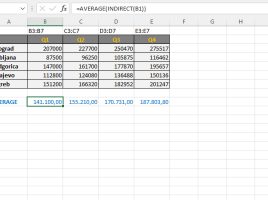
One of the earlier “recipes” was about the INDIRECT function. It serves to forward a range as a parameter of SUM, AVERAGE, MAX, MIN or, for example, some other aggregation function. A range is defined as string that is contained in another cell. Let’s show, in one simple example, how this works.

Function AGGREGATE

This is a function that is used to aggregate – group data from a given range, which is done by specifying a parameter that calls a specific function (SUM, AVERAGE, COUNT, MAX, MIN, etc.). We can also perform aggregation using other functions, but this one is specific in that it offers various options that allow you to ignore nested functions, hidden rows, errors …

LET function

The LET command exists in several programming languages ​​and is used to assign values ​​to variables. In a similar way in Excel, you can declare one or more variables, assign values ​​to them, and define the expression in which they are used using the LET function. This is especially beneficial when there are parts within the formula that are repeated several times. The LET function, in addition to shortening the formula, also significantly affects the performance …

Loan repayment

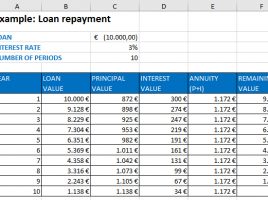
Financial functions in Excel allow for a variety of discounting operations. PMT function, for given present value, interest rate and number of periods calculates the total repayment value (annuity). How much, in this case, goes for the principal and how much for interest? To get answers to these questions you need to use the PPMT and IPMT functions.

ENCODEURL

The Registry of the National Internet Domain of Serbia (RNIDS) has been supporting Cyrillic (.срб) domains for some time, which is a good way to promote Serbian alphabet. The Internet also supports a number of other fonts that you can use freely within the Internet browser, but there are situations when it is necessary to “translate” terms in other languages into one understandable to computer, the so-called Pun Code. To perform this we use the ENCODEURL function.