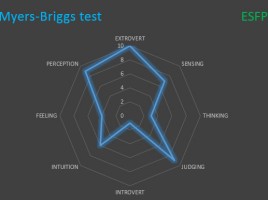
What’s your personality type?

Myers–Briggs test is the one you have probably already met on some of the job interviews, when completing the test where it seems that questions are repeated. It is a personality type indicator, on the basis of which the respondent is classified by four types and two subtypes: an extroverted-introvert, experienced-intuitive, thinking-feeling, judging-perceiving. The ideal tool for displaying the results of this test is the Radar chart.

Win-Loss chart

If you are engaged in budgeting and cost analysis it will be useful to know how to create a Win-Loss chart. This is a type of Bar Chart chart which, on the left side, holds negative values (most often the losses), and on the right side positive values (most often the gains). On the left side there can be also shown the costs, and on the right side the revenues. Let’s take a look at how this chart works!

Bing Maps

Most of us are using Google Maps, but a few years ago Microsoft also went into the race and created its own version of the maps named after its Bing search engine. From Excel 2016 exists an add-in with the same name that you can use to display charts on maps. It allows you to display data, in a form of charts, positioned on maps that can be customized to the desired report layout.

People graph

In the previous “recipe” you could read about add-ins that you can download from the Office Store. One of them is called People Graph, and starting from the 2016 version, it’s a standard part of Excel. People Graph is convenient for showing charts that describe the results of a survey in which a population is being tested. It is used in a very simple way, and it enables the creation of picturesque reports.

Excel add-ins

Office Store is a repository from which you can download a number of add-ins, arranged by categories, developed by the rich programming community, which gives you the ability to improve the reporting capabilities of Excel. Additions differ from traditional charts because they often have an interactivity element. Look at them as small apps that serve to improve the look of your reports.