
Date and time functions
When the reports contain dates and/or times, it is useful to know how to use the date and time functions. These functions allow us first to retrieve the system date and/or time and to display it within the cell. Then, by using them, we can distinguish a date/time unit (day, month, year, hour, minute, second, etc.) and use them to calculate the time or date in the future. For example, a date that comes in 5 days …
First, it is necessary to point out that the date and 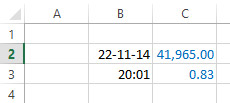 time does not exist! All of you who have blurred your eyes now and thought that I will lay some philosophical theories are wrong. In fact, when you enter a date and/or time, and try to format them as a number (CTRL +SHIFT+1), you get a numerical value. You can add or subtract other numbers with these “numbers”, and when you reset the format to date/ time (CTRL+SHIFT+3), you will see that the previous arithmetic operations changed the date/time backwards or forwards. For now we will not deal with the arithmetic of time, but focus on two functions that return the current date and time:
TODAY()
NOW()
These functions are used without arguments, and the date and time are retrieved from the date and time of the operating system. If we want to enter a date one time, we can also use the shortcut with semicolon (CTRL+SHIFT+;) which retrieves the date, or shortcut with colon mark (CTRL+SHIFT+:) which retrieves system time.
When we are working with dates, we use the functions to allocate day, month, and year from the cell where the date is found:
DAY (<date>)
MONTH (<date>)
YEAR (<date>)
If we want to calculate the number of days per week, we can use WEEKDAY. This function has two arguments: date and parameter (the index number that determines which day begins on the week). Similar syntax also has the function WEEKNUM, which determines the number of weeks per year. Syntax of these functions:
WEEKDAY (<date>,<parameter>)
WEEKNUM (<date>,<parameter>)
When we want to use time functions, to determine hour, minute or second by the given time value, we’ll use functions:
HOUR (<time>)
MINUTE (<time>)
SECOND (<time>)
There are two more functions that may be useful: DATEVALUE and TIMEVALUE. Their task is to convert the date, entered as text, to the corresponding number in a similar way as we would do with the CTRL+SHIFT+1 key shortcut.
