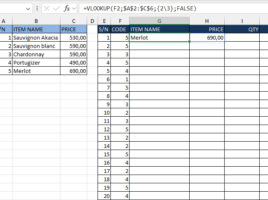
Lists as function arguments

Excel has recently made it easier to work with formulas that use arrays and constants – you no longer have to save them by pressing CTRL+SHIFT+ENTER! We can now use lists of values, given in curly brackets, as function arguments. This is great news, and the possibilities are manifold. In the following post, you will be able to see the real application of this feature…

Categories and subcategories

Excel can be a good tool for filling questionnaires and for this purpose are often used structured tables where we keep the results. When the result is one of a few, in advance known, values the input is done by selecting it from the list. Sometimes there is a need to, after choosing value in the first list, affect the items that appear in the second. For example, choosing a category affects the display of related subcategories. How can we achieve this?

Sorting of an array

Sorting of an array is arranging of its members in a ascending or descending order. This can be achieved in many ways, and in the text that follows you will see one of the variants of the algorithm called Bubble Sort. It works by running two loops and then, depending on their index values, corresponding members of the array are compared. If the condition is met they change places. The procedure is repeated until the comparison is completed, and array sorted.

Dynamic arrays

Sometimes we need to make an array that we are not sure of how many members will have. In this case should create dynamic arrays that, unlike the usual ones, do not have a fixed length. These arrays are declared in such a way that the number of members is omitted, and how many of them will be, or for how long the number of members of array should be increased is subsequently defined with commands that will be discussed in the text that follows.

Arrays

Arrays represent a group of variables of the same type. Since they often contain values that share common attributes, it is easier for us to assign them a unique name, and then to access each of them with an index number in a array. The index of the first member of an array is usually 0, and the index of the last one is smaller for one than the size of the array. It is possible to work with a whole array or with its individual members, they can be one or multi-dimensional …