Functions EARLIER and EARLIEST

Formula in calculated column will be evaluated using the row context, which means that all columns that are referenced give results in a row in which the formula is located. Evaluation continues for each subsequent row, so that by the end of the table. Since calculating final sum takes place iteratively we can hardly see what happened in the previous row as you would do in traditional Excel formulas. Here come into play EARLIER and EARLIEST functions.
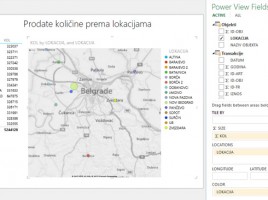
Maps in Power View reports

If Data model contains some universal geographic information (name of city, region, country, etc.) we can use them to create a chart within Power View. It enables creating maps based on Bing maps, after it automatically turns on the mechanism for searching and comparing geographical data from the model with the database of geographical locations. Maps are part of Power View reports ecosystem and they make a great supplement to the reporting panel.

Power View

This is a tool for creating homonymous graphical reports, built on of Microsoft Silverlight technology, and based on data from the Model. It allows creating rich graphical reports that show tabular data, charts, time-oriented charts, maps… Interconnection of its elements makes it an effective tool for making dashboards, and can be used for creating similar SharePoint reports.

Power Pivot charts

Similar as you encountered working with Pivot tables, PowerPivot reports also enable creation of interactive charts. Unlike those made by traditional Pivot charts they can be independent, which means you do not have to be directly connected to the pivot table; you can use data already contained in the Model. Together with slicers and timeline filters they can be used as a tool for creating rich dashboards

Advanced Data model options

In addition to options we use on daily basis Data model has some advanced options too. With them, we can define the perspective view on the table. Also, we can determine the behavior of columns when they are dragged in the Pivot Table, as well as to set additional attributes table that can be used when creating reports. Finally, it is possible to make one or more synonyms for each column, which later makes it easier to search the model.