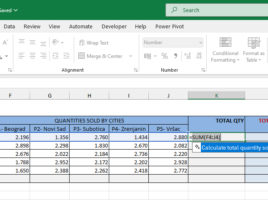
Copilot Formula Suggestions

Microsoft Copilot has brought several innovations in working with Excel, and one of them is the Copilot Formula Suggestions feature. This option makes it easier to create formulas by having Copilot proactively suggest next steps, recommend appropriate formulas based on data and context, and can even automatically complete the formula instead of the user. This speeds up work and reduces the possibility of errors when writing more complex formulas.

Version History

Version History is a great feature that can be used by all Microsoft 365 subscribers who store files on a SharePoint or OneDrive repository. Storing files in the cloud brings a lot of benefits, one of which is the overview of all versions and the ability to restore a previous version of an Excel document that was worked on by one or more users.

Power BI, logging and data import

In a previous post I talked about the history and gave brief introductory remarks regarding PowerBI service and its “tastes” (PowerBI, PowerBI Desktop, PowerBI Mobile). In the text that follows you will see how to apply on PowerBI service and import data from a desired source. We will connect to data table, taken from ERP solution, and connect to the data you will later use to create the report. Concentrate, the magic begins!

Options for opening documents

Anyone who has elementary computer literacy can open a document, whether it’s Excel or some other file. Excel 2013 brought several novelties that, even in doing this simple operation, make daily work easier. These are options for creating shortcuts to the most frequently used documents in the menu and opening a copy of an existing document. More detailed, in the text that follows …