
Data Cleanup
Clean Data is an AI feature in Excel that automatically finds inconsistent data and suggests error corrections. It works with data tables and usually, within their columns, finds excess spaces, uneven use of lowercase and uppercase characters, non-conforming formats, blank values, duplicates, errors… This option sometimes runs automatically, immediately after opening the document, and you can also run it manually…
We have opened a document that contains a data table with a list of items sold by one company. Let’s run the Clean Data option located in the Data ribbon.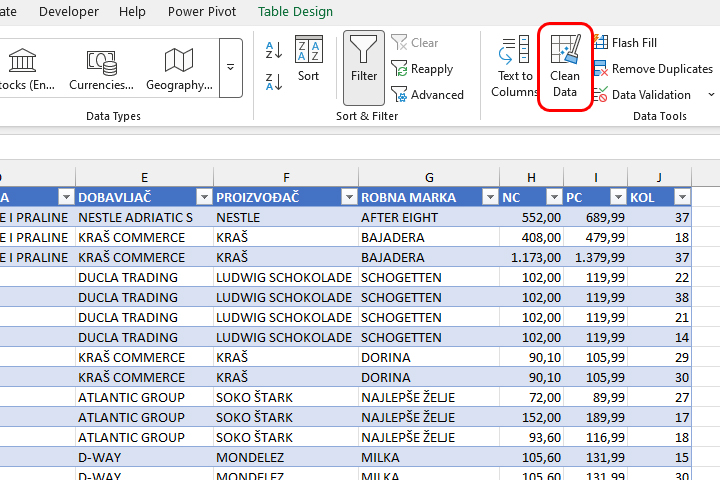
After you run this option, Copilot will search the data in the table and point you to places where it is possible to make corrections. In this example, it found columns that contain excess spaces. Clicking Apply will accept the suggested updates, and clicking Ignore will ignore them.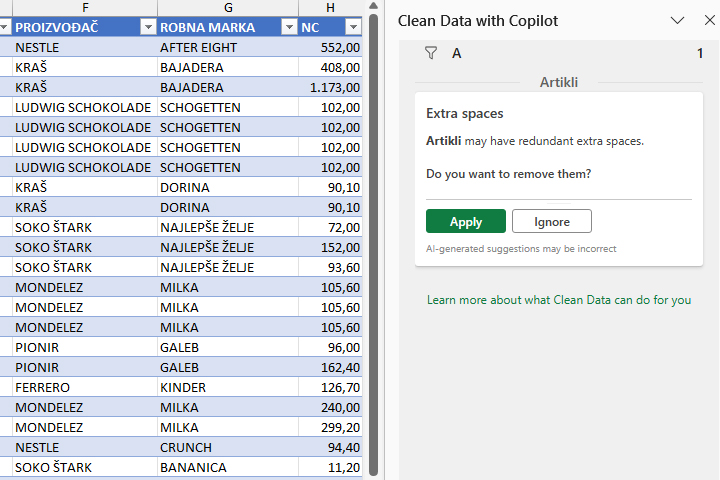
The Clean Data option is especially useful when editing master data because Copilot can spot patterns that the average user can easily miss. Keep in mind that Copilot can also make mistakes, so always check the returned results.