
Previous and subsequent periods
If we want to carry out calculations in previous or the next period in relation to the current date, should use “PREVIOUS” and “NEXT” Time Intelligence function. They allow aggregation of data, usually the column that contains the quantity or amount of sales, compared to the previous year, quarter, month or day, as well as in relation to the next year, quarter, month or day. In the example below you will see how to utilize this class of DAX functions.
We’ll use recent example on sales analysis of retail chain. First, we will add a measure called UkupnaProdaja (total sales), which aims to calculate the sum of the quantities sold:
UkupnaProdaja: = SUM (Transactions [KOL])
Below, let us show how we can keep track of sales in the previous period. For this we can use one of the DAX functions:
PREVIOUSYEAR (<date column>)
PREVIOUSQUARTER (<date column>)
PREVIOUSMONTH (<date column>)
PREVIOUSDAY (<date column>)
Date column represent a column in Calendar table that contains a date. It is always one of the arguments when we use Time Intelligence functions.
Now, we can create DAX expression for tracking sales in previous month:
ProsliMesec:=CALCULATE([UkupnaProdaja],PREVIOUSMONTH(‘Calendar'[Date]))
To track sales in subsequent periods we’ll use one of the functions:
NEXTYEAR (<date column>)
NEXTQUARTER (<date column>)
NEXTMONTH (<date column>)
NEXTDAY (<date column>)
In a similar way, we will write DAT expression for tracking sales in the coming month:
NaredniMesec:=CALCULATE([UkupnaProdaja],NEXTMONTH(‘Calendar'[Date]))
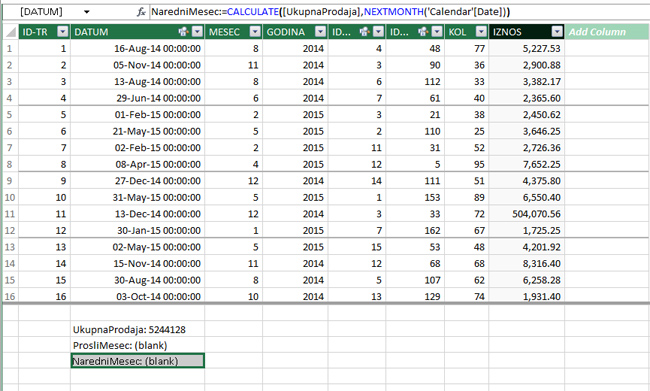
Further, if we create a Power Pivot report, drag YEAR and MONTH from Calendar table in Rows, and then measures ProsliMesec, UkupnaProdaja and NaredniMesec in Values we’ll get a report in which should see sales for previous and next month, compared with central column which represents current sales.
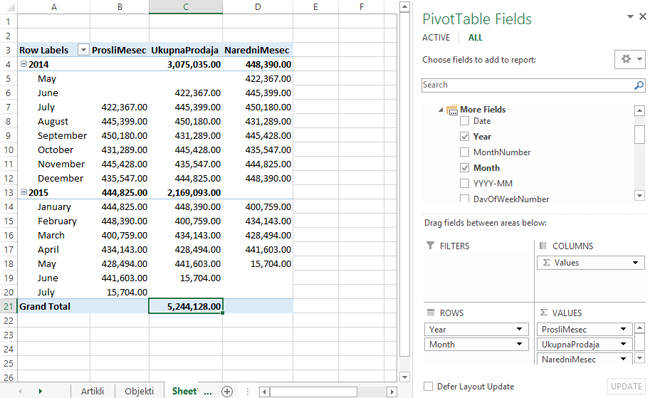
Dimensions used for filtering report, according to time, should be always added from Calendar table. We could have used other dimension in Rows, such as KLASIFIKACIJA (CLASSIFICATION), but in that case we should have use filter or slicer with date from Calendar table, to give context to the report.