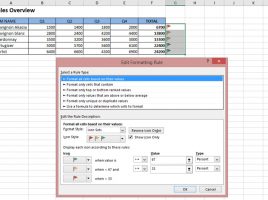
Traffic lights

Conditional formatting is an Excel functionality that is often used, and allows you to emphasize certain parts of the report. Typically, conditional formatting is used within the same column, but how do we display “traffic lights“, icons that indicate a change in business, within another column? This is a very simple procedure, and if you want to find out how this is done, you have it in this “recipe”.

Physical examination

Are you overweight? Weight gain is not just an aesthetic problem, it can be the cause of many diseases, so companies conduct an annual physical examination to check the health of their employees. In this example, you will learn how to calculate BMI (Body Mass Index), a coefficient that indicates whether you are below or above the optimal body weight, and how to use conditional formatting to mark those who have unfavorable BMI.

Differences between tables

In your day-to-day work, many of you copy data from a company’s business information system or some spreadsheet where they are exported to create the necessary reports. The problem arises when the data changes. How to trace where the change occurred? What is the difference between a source and a derived table? In the text that follows, you will see how to use the INDEX and MATCH functions, as well as the conditional formatting technique, to highlight the differences between the tables.

Comparison of two worksheets

In practice, it is sometimes necessary to compare the contents of two spreadsheets. With the exception of specialized Excel plugins that can be used for this purpose, the best way to achieve this is with the help of a formula in which we use the IF function or by using conditional formatting. In the text that follows, you will see how to compare the two tables, which are in two spreadsheets, and contain randomly generated numbers.

Star Rating

When we want to give our opinion about a product, we are often able to evaluate it by assigning a certain number of stars. Our rating updates the previous state, and the product score is always a number. How do you calculate how many total stars a product should have based on the score number? There are several ways to do this in Excel, and one of them is by applying the Conditional Formatting option.