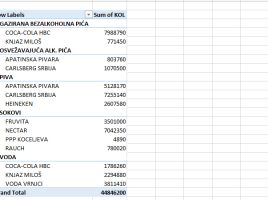
Include Filtered Items in Totals

Include Filtered Items in Totals is a very useful option that we can find in pivot table settings, and it allows us to display the correct total for values ​​in rows or columns that we have previously filtered. By using the DAX expressions we can most certainly reset the filters and thus calculate the correct sums, but sometimes there is no need to do this. Only by selecting/deselecting this simple option, we can get the correct totals in the report.

Arranging filters in a pivot table

In one of the previous posts, there was a general mention of pivot table options, and in the next few “recipes” we will address some of them that are important and can make our daily work easier. Filtering the pivot table is achieved by dragging report dimensions into the Filters field. How can we influence the number and layout of available filters in the pivot table?

Power Query parameters

Parameters are variables or sets of values ​​that are intended to influence the appearance of a query. They are mostly used for filtering, but if you know the “M” language you can also use them for other purposes. Since I will not (for now) write about how “M” statements are created, I will use a simple example where a single parameter will be created and we will use it to filter a query.

Conditional Column

Power Query has a feature called Conditional Column, and its mission is to emulate the Excel IF function. That is, by checking the conditions for the given column and the value returns the result if the condition is fulfilled and optionally the result if not. If no other parameter is specified it returns a NULL value in rows that do not meet the specified condition. Let’s see how this option is used!

Group By option

Power Query has features that allow you to group and aggregate data in a similar way as when writing T-SQL structures, without writing a single line of code. Therefore, the process is much faster and easier. Grouping can be done by one or more report dimensions, and the order is determined in a similar manner as when sorting. Also, multiple data aggregation functions are supported as well as possibility of multiple aggregation…