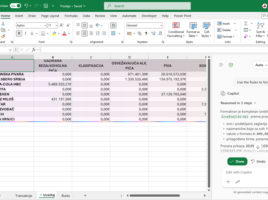
Excel Copilot: Rules and Skills

In order for Microsoft Copilot to  work faster in Excel and provide results that are more in line with user expectations, it is now possible to define a set of rules that Copilot will  apply when creating calculations, formatting tables and charts, as well as other tasks. This is where Rules comes in, a new feature that allows you to standardize the way Copilot processes and displays data. Combined with Skills, which expand its capabilities, Excel reporting becomes more accurate and efficient.
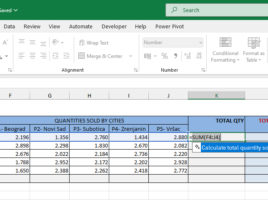
Copilot Formula Suggestions

Microsoft Copilot has brought several innovations in working with Excel, and one of them is the Copilot Formula Suggestions feature. This option makes it easier to create formulas by having Copilot proactively suggest next steps, recommend appropriate formulas based on data and context, and can even automatically complete the formula instead of the user. This speeds up work and reduces the possibility of errors when writing more complex formulas.

Autosave and versioning

Automatic saving of Excel documents has been around for a very long time. If you go to Excel Options, in the Save section, you will see the option to Save Autorecover Information Every… and the number of minutes after which the saving is performed. However, this works if your computer resets or for some other reason stops working. With the advent of the OneDrive repository and storing documents on it, we got a new, better Autosave…

Excel and Microsoft Forms service

Everyone knows that at the end of the year I often post “recipes” that have something to do with the Christmas and New Year holidays. This time I decided to show you how to combine Excel and Microsoft Forms, a Microsoft 365 service used to create questionnaires, quizzes, polls… In this text, you will find out how to create a New Year’s questionnaire by creating a form directly from Excel.

Version History

Version History is a great feature that can be used by all Microsoft 365 subscribers who store files on a SharePoint or OneDrive repository. Storing files in the cloud brings a lot of benefits, one of which is the overview of all versions and the ability to restore a previous version of an Excel document that was worked on by one or more users.