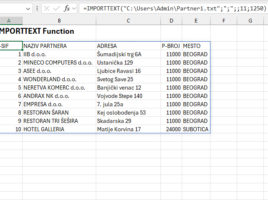
Text import functions

Until now we used Text Import Wizard to import text, and nowadays we can achieve the same result, whether it’s TXT or CSV files, with two new functions: IMPORTTEXT and IMPORTCSV. These functions are very similar: the first one offers more features, while the second is intended exclusively for importing from CSV files. Both functions return a dynamic array, are easy to use, and can make it much easier to import data.
Decimal point or a comma?

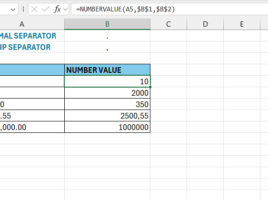
When you enter decimal numbers, depending on the Region settings, you will use a decimal point or a comma. In most cases, this is done once, and we don’t deal with this topic anymore. However, it may happen in practice that you import data, most often from a CSS file, where different characters are used to separate decimals and groups than those you use by your local settings. In this case, use the NUMBERVALUE function…

Lists as function arguments

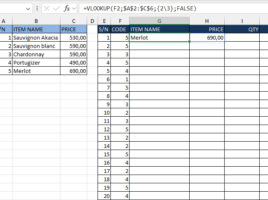
Excel has recently made it easier to work with formulas that use arrays and constants – you no longer have to save them by pressing CTRL+SHIFT+ENTER! We can now use lists of values, given in curly brackets, as function arguments. This is great news, and the possibilities are manifold. In the following post, you will be able to see the real application of this feature…