
Text import functions
Until now we used Text Import Wizard to import text, and nowadays we can achieve the same result, whether it’s TXT or CSV files, with two new functions: IMPORTTEXT and IMPORTCSV. These functions are very similar: the first one offers more features, while the second is intended exclusively for importing from CSV files. Both functions return a dynamic array, are easy to use, and can make it much easier to import data.
The syntax of the IMPORTTEXT function is as follows:
IMPORTTEXT(<path>,[<delimiter>],[<skip>],[<keep>],[<encoding>],[<locale>])
Meaning of arguments:
- path – The path or URL to the file to be imported.
- delimiter– the character used to separate columns in the file. If we omit it, the default value is Tab.
- skip – the number of rows to skip. If the number is negative, the rows from the end are skipped.
- keep– the number of rows to keep. If the number is negative, the rows from the end are kept.
- encoding– code page. The default value is UTF-8.
- locale – Specifies the setting of the record in accordance with the Region Settings.
If we enter the following formula in cell A2:
=IMPORTTEXT(“C:\Users\Admin\Partneri.txt” , “;”, ,11,1250)
Excel will import from a text file in the form of a dynamic array.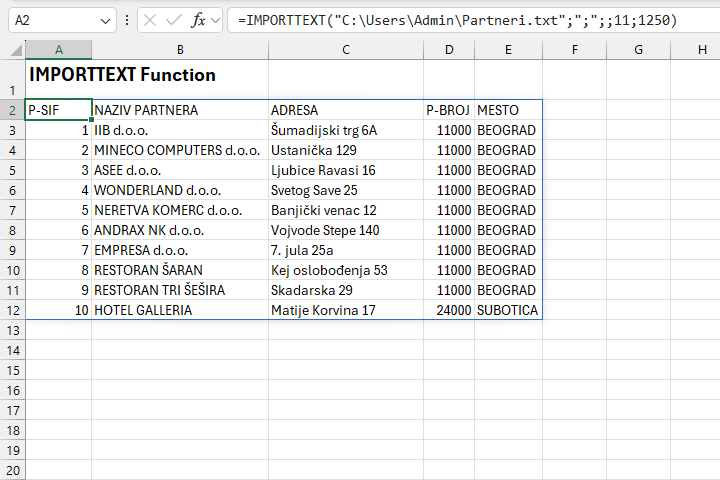
The syntax for the IMPORTCSV function looks like this:
IMPORTCSV(<path>, [<skip>], [<keep>], [<locale>])
Meaning of arguments:
- path – The path or URL to the file to be imported.
- skip – The number of lines to be skipped.
- keep – The number of rows to be kept.
- locale – Specifies settings in accordance with the Region Settings.
This function is a little simpler than the previous one and offers fewer features. It implies that the column values are separated by a comma, and that the encoding in the UTF-8 file is applied.
If we enter the following formula in cell A2:
=IMPORTCSV(“C:\Users\Admin\Partneri.csv”,,11)
Excel will import from a CSV file in the form of a dynamic array.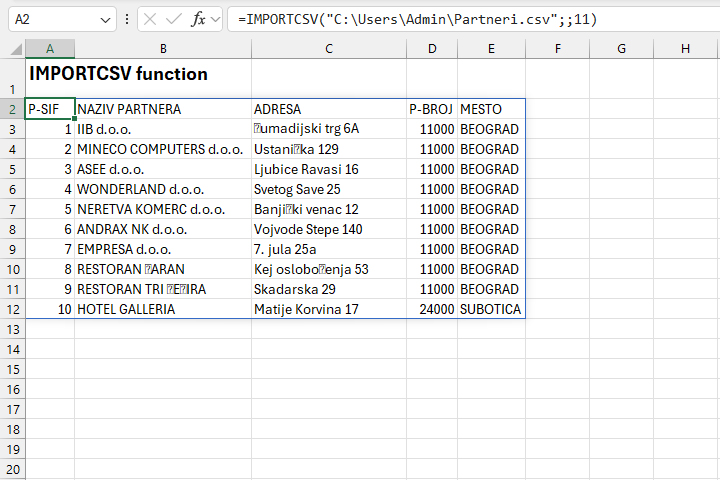
Note that both of these features do not automatically update after a change on the source side.