The first few rows
How to take the first few rows from a table? How do we make this a parameter that we can change? This feature can be useful when we simply want to retrieve the first few rows from a table, or when it contains e.g. some sales data, we can sort them in descending order by the column that contains the sales value, and then we extract the Top 5 items.
For this purpose, we will use the TAKE function. In the range A2:A502 there is a table with data on sales transactions. With the help of the formula:
=TAKE(A2:E502; I1+1)
We take the first 5 rows, which is the value of cell I1, which we used as the second argument. In the formula, we have added another row to represent the header.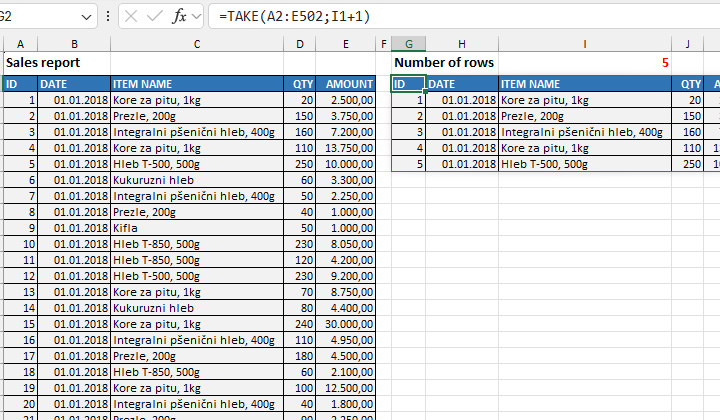
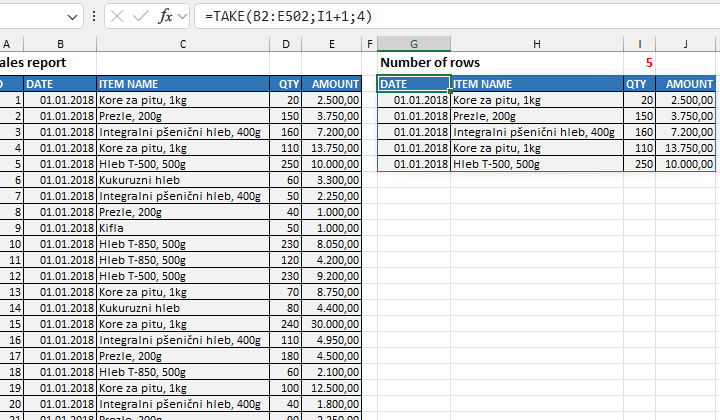
The first column in the source table contains an ID that we don’t need. If we narrow the range by one column, and then add another parameter within the TAKE function to specify how many columns we want to take, and write the formula:
=TAKE(B2:E502; I1+1; 4)
We will get a result like the one you see in the picture. In the final table, in both cases, we used the display format of the source table.